Player understanding · Unity interface decisions
Game Tutorial Design: Help Players Understand Their First Real Choice
Choose how to teach a mechanic, when to remove the help and what to include in a playable introduction.
Game tutorial design is the work of teaching players how an action changes the game, when it is useful and how to recognize its result. For a game owner commissioning that work, the first decision is not how many instruction screens to order. It is what a new player needs to understand before the next meaningful choice.
A player can follow a flashing arrow without understanding why the highlighted button matters. A better introduction connects a visible problem, an action the player performs and feedback that explains what changed. Then it gives the player an opportunity to use that action with less help.
If your current Unity project needs a clearer introduction, scope it alongside the game interface and its implementation. The work may involve prompts and visual feedback, but it can also change the order in which controls become available or the conditions under which help disappears. Those are playable decisions, not just screen artwork.
Start with what the player needs to understand
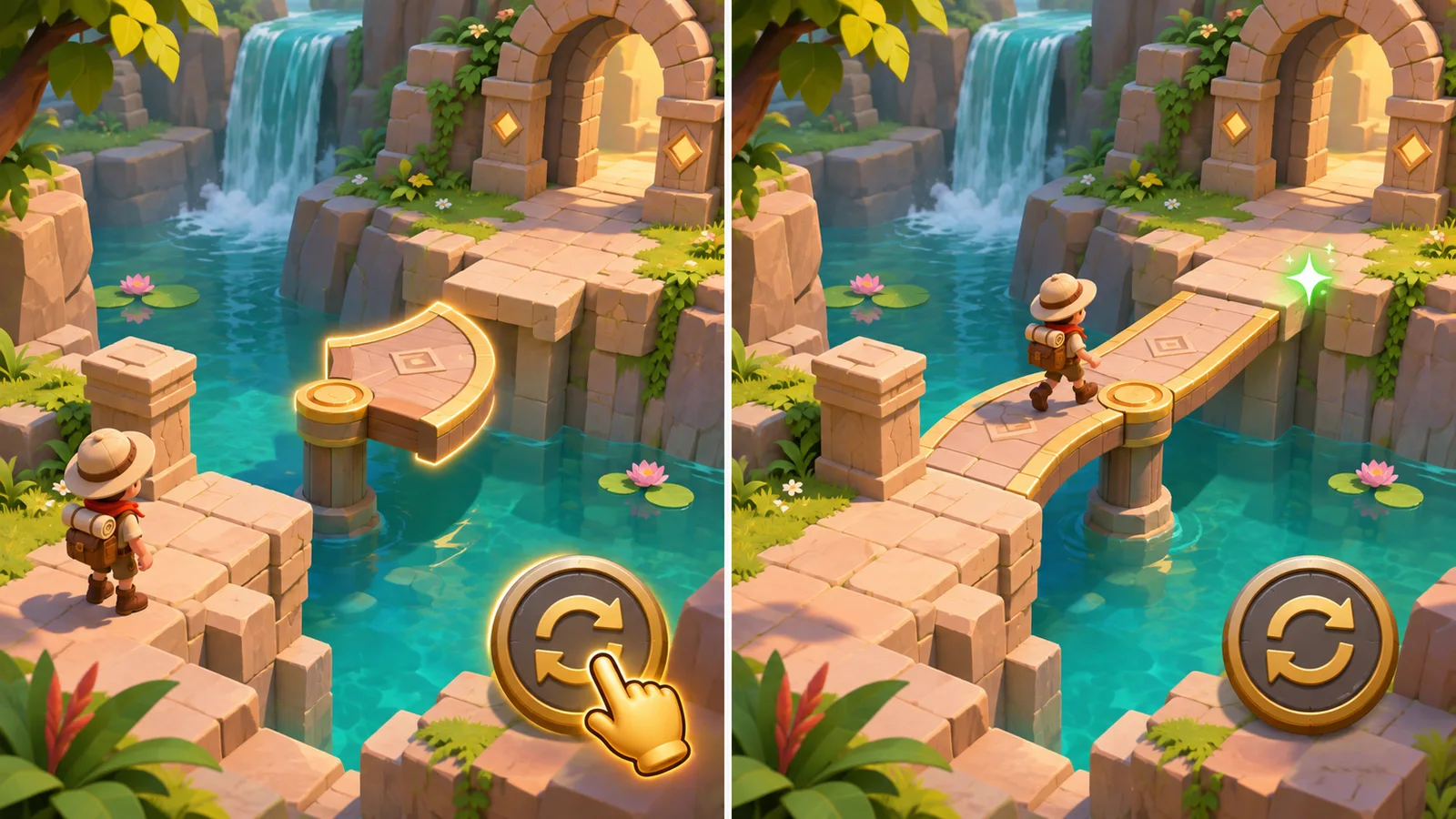
Write the learning goal as a useful action: “rotate the bridge to connect the crossing.” “Learn the controls” is too broad to guide a specific introduction. Name what the player sees before acting, what they can do and what makes the result understandable.
Also separate knowing the input from knowing its purpose. A player may discover a rotation button immediately but still not notice that the bridge has an opening on only one side. Another may understand the crossing but fail to identify the control. These need different changes: clearer world feedback in the first case, clearer input presentation in the second.
The level design guide covers objectives, routes and encounter pacing. Tutorial work asks a narrower question within that route: what information and practice will help an unfamiliar player make the intended choice? An attractive opening level does not answer that question by itself.
Choose how much help the mechanic needs
A short explanation, a guided attempt and contextual help can all be appropriate. Choose according to the unfamiliar part of the action and the consequences of getting it wrong.
| Approach | Where it can help | What to watch for |
|---|---|---|
| Brief explanation or demonstration | A simple rule the player can immediately try | The explanation may be dismissed before its purpose becomes clear |
| Guided attempt with a highlighted action | An unfamiliar interaction that needs a safe first use | Following the highlight can conceal whether the player understands the result |
| Contextual help when the feature matters | A secondary action introduced later in normal play | Help needs a reliable trigger and should not interrupt an unrelated decision |
| Optional hint or replayable help | Players with different experience or someone returning after a break | The route to help must remain discoverable without forcing everyone through it |
These approaches can be combined. Teach the essential action early, then introduce a secondary feature when it becomes useful. Roblox's official onboarding techniques documentation illustrates visual guidance, contextual tutorials and timed hints. Those are useful design patterns; they do not prescribe a universal sequence or a timing value for your Unity game.
Avoid choosing a fixed delay because another game's hint appears after that many seconds. Watching someone hesitate can reveal several different causes: they may be exploring, reading, misunderstanding the goal or unable to see the control. The timing should follow the problem you are trying to address.
A bridge puzzle: prompted success versus understanding
Consider a hypothetical mobile puzzle. An explorer reaches a gap. A bridge section can rotate, and aligning it creates a crossing. This example is a design exercise, not a result from a tested client game.
One version opens with a panel describing rotation, crossing and later puzzle features. The player closes it and faces the scene. It is inexpensive to explain on paper, but the design still needs to answer whether the player connects the instruction to the object in front of them.
A second version highlights the rotate control and waits for a tap. When the bridge aligns, the world changes visibly and the prompt disappears. That connects input to consequence more directly. However, one correct tap still does not show that the player understands how to choose an orientation.
A useful next situation changes the bridge's starting direction and removes the pointing hand. The player can now apply the relationship rather than repeat a memorized tap. If they keep pressing without inspecting the bridge, consider whether the control's effect or the crossing's alignment needs clearer feedback. Adding another paragraph of instructions may address neither problem.
Keep the comparison focused. Do not simultaneously replace the camera, art, movement speed and explanation and then assume the new text caused the difference. Record what the player tried and what the game showed before deciding which part to revise.
Keep guidance from becoming a trap
A guided step often limits interaction to keep attention on one action. That creates practical questions your team should resolve before polishing the overlay. Can the player pause? What happens if the app is interrupted? Does the instruction still make sense if the action has already happened? Can a visible overlay cover the very control it asks someone to use?
Agree what skipping actually skips. It may dismiss an explanation while leaving the level playable; it should not silently grant an upgrade or complete an unrelated objective. If a setup action is genuinely required, separate that requirement from the teaching presentation. Otherwise, the only way out of an instruction can become an action the player is currently unable to perform.
Provide a way to revisit useful instructions when that suits the game. Returning players may need a reminder even when their original tutorial is complete. Define which help can be reopened and whether it pauses gameplay. The accessibility guide can help separate clearer presentation from changes to the interaction itself; a bright arrow alone is not a complete accessibility solution.
Review learning, not only the completion counter
Watch a representative new player try the action without coaching every step. Distinguish “the player tapped the highlighted control” from “the player recognized when to use it again.” Both are observations worth recording, but they answer different questions.
A completion funnel can identify where people stop progressing. Unity's funnels documentation describes tracking ordered events and examining drop-off between steps, including tutorial progression. It does not make every recorded completion proof of understanding.
For the bridge example, instruction shown, guided rotation completed and later unprompted use are different observations. Decide which ones matter before implementing measurement. Use the Unity analytics guide for event definitions and verification rather than adding many counters without a product question.
Neither a small observation session nor a better completion rate guarantees retention or revenue. Use the evidence to choose a specific next revision and keep its limits visible.
What to include when requesting tutorial work
Send the current build or prototype, intended players, input methods and the mechanic that currently causes confusion. Include any observations you already have, together with the version and the route used. A recording can help distinguish an unclear action from a defect that prevents the correct action.
Ask the proposal to identify the teaching approach, prompts and supporting assets, trigger conditions, skip and revisit behavior, approved copy and languages, and any required changes to playable logic. State whether the engagement includes observing players, integrating measurement or only implementing an agreed design. These are different scopes.
Request a representative playable introduction before commissioning instructions for every feature. In our casual game production guide, the first session is one part of deciding whether to scale production. Here, the focused milestone is the mechanic's introduction and an opportunity to use it without the original prompt.
Game tutorial design questions
What is game tutorial design?
It is the design of instructions, practice and feedback that help a player understand an action and use it in the game. It can involve the interface, the playable situation and when help appears, rather than a separate sequence of text screens.
Should players be able to skip a game tutorial?
Choose according to the game and the action being introduced. Optional or replayable help may suit experienced and returning players. If a setup action is necessary, define it separately from the explanation so dismissing instructions does not break progression or silently complete unrelated work.
Does tutorial completion mean players understand the game?
No. A player may complete a prompted action without recognizing when to use it independently. Combine progression data with observations of later use, and distinguish successful instruction-following from a useful choice made without the same prompt.
Discuss the introduction your game needs
Share the mechanic, current build, target players and where they get stuck. Upload For Software can discuss a bounded Unity interface and implementation scope with the prompts, playable behavior, review and source handover agreed in advance. If the entire game is being commissioned, start with game development services.
Discuss your game interface or send the current page and your brief on WhatsApp.