Game production · Player access
Game Accessibility: What to Include in Your Development Brief
Choose the barriers to address, the alternatives to provide and the first playable route to review.
Game accessibility means reducing barriers that stop people from understanding, controlling or progressing through a game. Before commissioning development, describe those barriers and the experience you want players to reach. A useful scope says whether the work adds an option to an existing interaction, changes the interaction itself, or needs a specialist review. “Make the game accessible” leaves all three decisions unresolved.
For a publisher or game owner in Egypt or the Gulf, this is a production decision as well as a design decision. You may need readable Arabic objectives, controls that do not require sustained dragging, or an alternative to a warning that only plays through sound. These are different assignments. Start with the player journey that matters to your game, then ask the development team to explain the changes, dependencies and limits.
Start with the barrier, rather than a settings checklist
Consider the route from opening the game to completing a first session. Where does the player need to read, distinguish something, hear a cue, hold a control or act quickly? An option is useful when it removes a barrier on that route. A long settings menu can still leave the main obstacle untouched.
For example, changing the colour palette does not help a player who cannot hold a finger on a small moving target. Increasing dialogue size does not help when the objective disappears before the player finishes reading it. Write down the blocked action and its consequence before selecting a feature.
Ask the team to show where the proposed alternative works: in the menu, during play and on the result screen. Prioritise barriers that prevent starting, making a necessary decision or completing the core action. This gives a limited first milestone a clear purpose without pretending that it addresses every player's needs.
Separate better presentation from a different game interaction
Some changes preserve the rules while communicating them through another route. A gem can have a distinct shape as well as a colour; a countdown can have a visual indicator as well as a sound. Microsoft's guidance on visual and audio cues explains why important information should have alternatives to colour or a single sensory channel.
Other changes affect what the player must do. Replacing a sustained hold with a toggle changes the input behaviour. Offering a turn-based alternative to a timed puzzle changes how success is measured. These can be good choices, but they deserve explicit design and production scope rather than being hidden inside a request for a nicer interface.
| Barrier in your game | Possible intervention to discuss | Consequence for the project |
|---|---|---|
| Gems are distinguishable only by colour | Add a consistent symbol or silhouette to each type | Art, instructions and feedback need the same visual language |
| A necessary action requires a long hold | Offer a toggle or another deliberate action | Define activation, cancellation and interruption behaviour |
| Text becomes unreadable on the target screen | Improve its presentation and supported size options | Layouts must accommodate the resulting text, including longer translations |
| A timed task blocks the intended audience | Consider adjustable timing or a different mode | Review scoring, rewards and any competitive comparison separately |
These are planning options, not a universal feature list. Choose the intervention that fits the obstacle and explain what remains outside the assignment.
A practical example: commissioning a garden puzzle
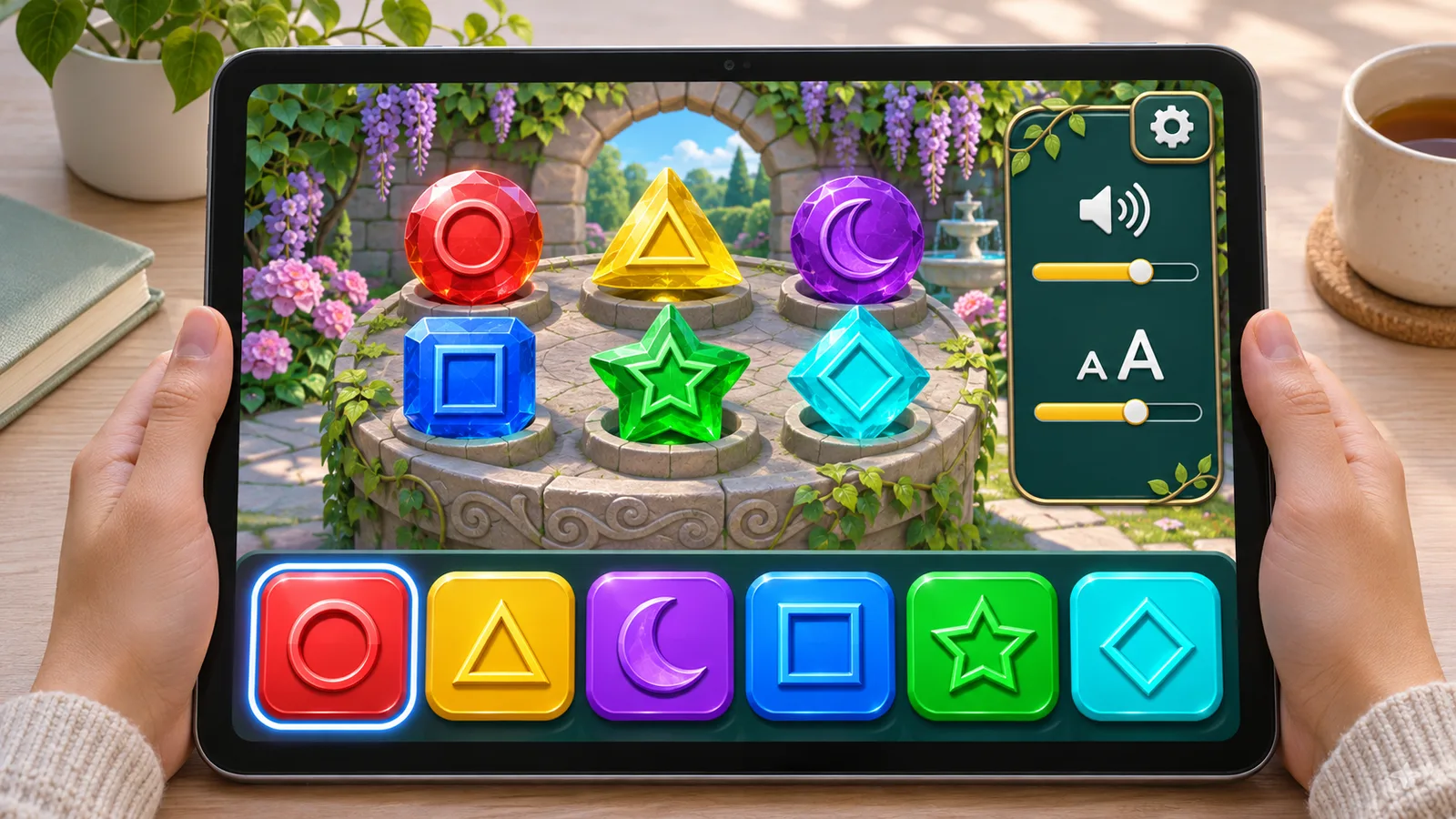
Imagine a new garden puzzle with coloured stones, a timer and drag-to-match controls. The goal of the first milestone is to let players identify a stone and make a move without relying only on colour or sustained dragging. This is a hypothetical design example, not a report of player testing.
The first option is to add a stable shape to every stone type and use that shape consistently in the objective and selection feedback. The second is to allow a player to tap a stone, then tap its destination. The developer should explain how selecting, changing the selection and cancelling a move will feel. A visible selection outline matters because the finger is no longer continuously pointing at the chosen stone.
Keep the timer decision separate. A practice mode without a timer may help someone learn the controls; a turn-count mode changes the challenge. If the original mode has a competitive leaderboard, decide whether the alternative shares it or has separate comparison rules. Do not silently remove a time constraint while leaving the original scoring assumptions unexamined.
For the first review, ask for one small playable puzzle with the proposed choices. You can decide whether the interaction is understandable before paying to adapt every level, objective and tutorial. That is a narrower and more useful commitment than approving a mockup of an accessibility menu.
Controls and text need different kinds of attention
Control remapping can be useful, but it does not remove every input barrier. Microsoft's input guidance distinguishes demands involving speed, complexity and duration. When discussing a control change, ask which demand it removes. Moving a repeated action to another button may leave the repetition itself unchanged.
Text needs a different discussion. Review the instructions and menu at the intended screen size, including the largest supported text setting. A bigger label that covers the confirmation button is not a complete solution. Microsoft's text-display guidance treats menu text, gameplay text and configurable presentation as parts of readability.
If the game supports Arabic, commission approved copy, appropriate text direction and layout behaviour as their own requirements. Our Arabic game-localization guide explains that implementation boundary. Correct Arabic display and accessible controls support different needs; completing one does not establish the other.
What changes the estimate?
Ask for an estimate against named flows and interventions. The important distinction is often whether the team can adjust an existing system or must redesign a behaviour used across the game. One scalable text component and dozens of individually positioned labels create different workloads. A tap alternative used in one puzzle is different from adapting navigation, combat and inventory together.
Other scope factors include the current project structure, number of screens and content types affected, supported devices and languages, persistence of preferences, and the review needed after a change. Ask what must be updated together and which assumptions the estimate relies on. There is no meaningful universal price for an unspecified “accessibility pass”.
The Game Accessibility Guidelines offer a broader reference, including remembered settings and feedback from players. Use a reference to find omissions, then select the work your project actually needs. For specialist features or a formal accessibility claim, identify the expertise and review required before promising the outcome.
Review a complete route with the people it is intended to help
A functional developer check can establish that an option changes a value. It cannot by itself establish that the intended players can use the result comfortably. Include feedback from players with relevant access needs, with a suitable specialist where the project requires one. Keep that work visible in the budget and schedule rather than implying that ordinary device QA replaces it.
In the puzzle example, the route includes finding the option, reading the objective, selecting a stone, correcting a selection, finishing and starting again. Record which barriers improved, which remain and what the reviewer could not assess. A difficulty complaint and an unreadable objective are different findings; they should not disappear into one “passed” result.
Bring the blocked player journey to the development discussion
Upload For Software provides scoped Unity interface design and implementation; our game UI/UX service shows the work and delivery boundaries. That production experience is not a claim of accessibility certification or specialist player research. Define those responsibilities separately when your project needs them.
Send the current build or prototype, target platforms, languages and the actions players struggle to complete. We can discuss which interface changes fit a bounded Unity milestone and which questions need further specialist input before a wider game-development engagement.
Request a scoped interface estimate or describe the player journey on WhatsApp.