3D production · Visual direction
Game Art Styles: Choosing a 3D Direction Before Production
Compare the look, its gameplay purpose and the work needed to keep it consistent across your game.
Choose a game art style that makes the important actions readable and that your team can reproduce across the whole game. For a 3D project, compare the shapes, surface detail, color and lighting of a representative scene at the gameplay camera. A favorite promotional image is a useful reference, but it does not define the work required for a complete asset set.
A simple faceted world, a rounded stylized world and a naturalistic world can all support a good game. The useful question is which direction serves your particular experience, supported devices and production scope. This guide helps a project owner make that choice before commissioning a large batch of 3D assets.
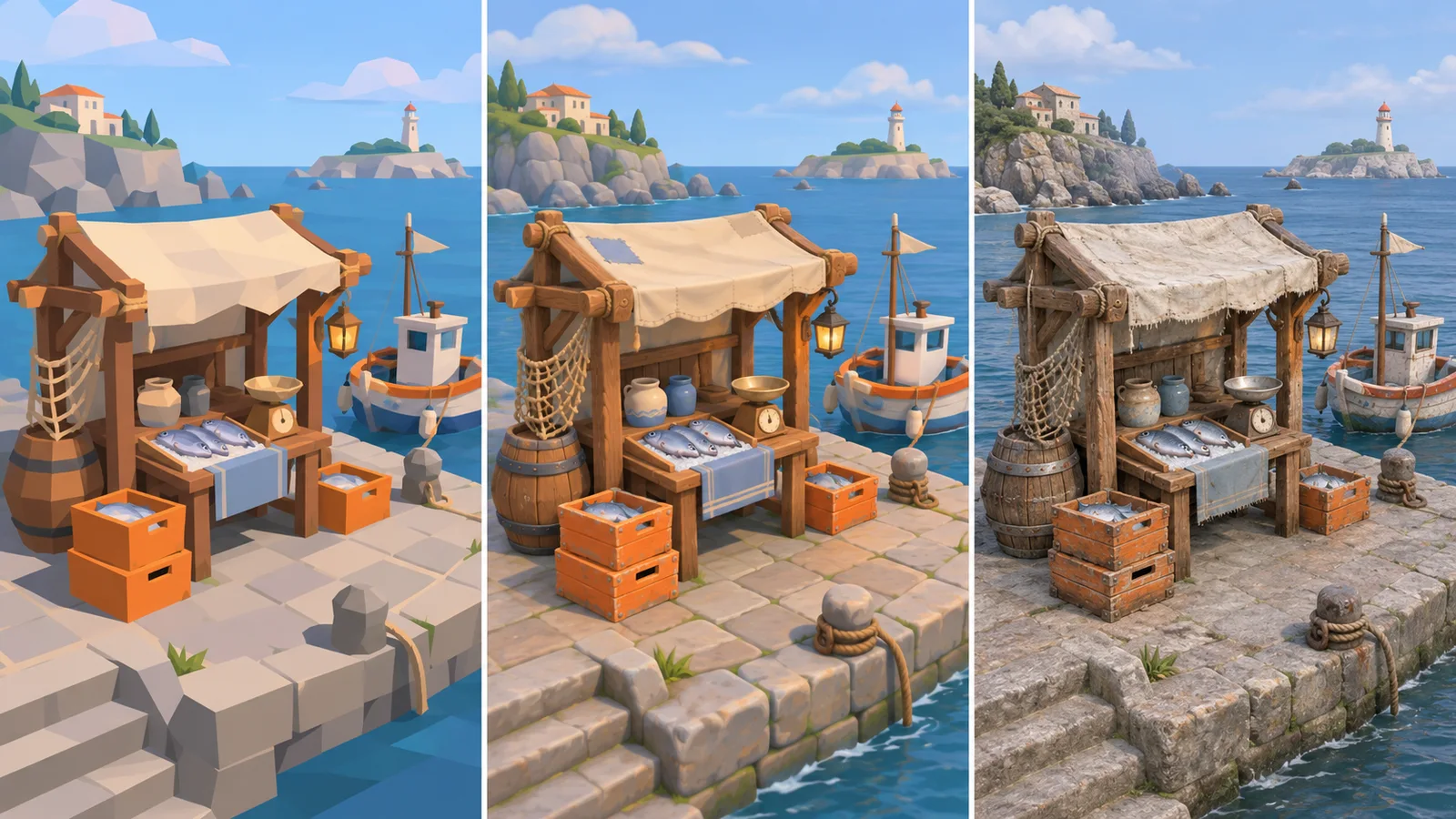
The comparison shows the same imagined harbor stall treated three ways: faceted on the left, rounded and stylized in the center, and naturalistic on the right. It illustrates a planning choice, not a performance test or a finished client project.
Separate the visual style from the number of dimensions
A decision to use 3D does not require a realistic appearance. A 3D game can use deliberately simplified proportions, visible flat faces, painted-looking surfaces or cartoon shading. Likewise, “stylized” describes a direction rather than a complete production specification.
If the gameplay representation is still undecided, use the 2D versus 3D project guide, in Arabic first. Here we assume that a 3D production path has been chosen and focus on the visual rules the artist will follow within it.
Keep a distinction between a technical mesh description and an artistic look. A lower-detail game mesh can still have a smooth, detailed-looking surface. Conversely, visible facets can be an intentional part of the design. Ask the team what the reference means for both appearance and implementation, rather than treating “low-poly” as a complete quote.
Compare three directions against the same needs
| Direction | What you are choosing visually | Questions to resolve before production |
|---|---|---|
| Faceted and simplified | Large planes, controlled detail and deliberate shape reduction | Which edges and silhouettes must remain recognizable at the gameplay distance? |
| Rounded and stylized | Altered proportions, expressive shapes and selective surface detail | Which proportion, color and material rules should repeat across characters and props? |
| Naturalistic | Grounded proportions and surfaces intended to resemble believable materials | Which close views and material details matter enough to produce and review? |
These directions are not fixed price tiers. A simplified scene with many unique animated assets can require more work than a small naturalistic scene. A stylized direction may also need substantial iteration before the shapes feel coherent. Compare the actual deliverables and revision needs.
Unity's guide to finding a visual style emphasizes consistency across assets and describes low-poly and toon approaches among the available choices. Use that vocabulary to discuss the result, while making your own project's rules more specific than a style name.
Start with the camera and the player's decision
Write down what the player needs to recognize during ordinary play: an enemy, a usable door, a collectible or a safe route. Then consider the distance and angle at which each appears. A decorative mark that looks attractive in a close render may contribute little from a distant gameplay camera.
Decide which shapes deserve emphasis. A trading stall might use a distinctive canopy to identify its purpose before the player can read a sign. Its crates may need strong color separation if they contain different resources. Those choices can matter more than adding scratches to every plank.
Do the review at the intended screen size and with relevant interface elements visible. If the scene only works as a large presentation image, it has not yet answered the gameplay question. Record what remains unclear and compare a targeted change instead of requesting “more detail” everywhere.
Work through one scene before selecting the whole style
Imagine a small harbor game with a trading stall, a fishing boat and crates of supplies. The camera is elevated and the player identifies a stall before approaching it. This is a hypothetical example for comparing scope.
In a faceted treatment, the canopy silhouette and a few broad colors could carry most of the identity. In a rounded stylized treatment, exaggerated crate shapes and a consistent treatment of edges might become part of the direction. In a naturalistic treatment, believable wood, cloth and stone relationships could matter more as the camera gets closer.
Now change the requirement: the player can inspect goods in a close view. Each proposal needs another review at that distance. The faceted version may intentionally preserve broad shapes; the stylized version may need selective painted detail; the naturalistic version may expose surfaces that were previously too distant to matter. Decide whether the close view justifies that extra production scope.
Keep the content and camera comparable while choosing. If one proposal adds more buildings, dramatic weather and a different lens, it becomes difficult to tell whether you prefer its art style or its presentation. Approve the direction for the game you are actually building.
Turn preferences into rules an artist can use
A short visual brief can explain the intended shape language, proportions, palette, surface treatment and level of detail. Include a few annotated references showing what you want from each. A reference might contribute its soft shapes without contributing its color palette or realistic materials.
Also record what should be avoided. For example, your harbor may use clean broad colors while reserving busy patterns for important stalls. A highly detailed background object could distract from that decision even if it looks excellent by itself. A clear reason helps the artist propose a suitable alternative.
The game environment production guide covers the wider space, modular pieces and technical handover. Keep those requirements alongside the visual direction. The style brief explains how the assets should belong together; it does not replace the environment scope.
Compare quotes by the work behind the look
Ask whether the quote includes exploring the direction or producing assets against an already approved reference. These are different assignments. If the style is unresolved, price and review a bounded exploration step before treating every asset as routine production.
Clarify the unique asset set, variations, animation needs, source files and Unity integration. Ask how revisions to the approved look affect existing work. Changing proportions can affect more than the model preview; changing the surface treatment can affect multiple assets and the way they read in the scene.
Do not infer performance from the label. Agree the target hardware and a representative scene, then review the actual result. The lighting approach guide helps separate an illumination decision from the shape and surface direction. Combining every change at once makes comparisons less useful.
Use the approved direction without freezing every detail
Keep a compact reference of the accepted rules and representative assets. As new content arrives, compare it with the rest of the scene, rather than approving each object in isolation. A new asset should have room for its own purpose while respecting the shared visual language.
If the direction changes later, list which approved assets are affected and agree the next scope before expanding production. The asset outsourcing guide, in Arabic explains the supplier, sample and batch discussion after the direction is sufficiently clear.
For an example of our own Unity production, explore ROADFORGE. It shows one real project's art inside its gameplay and workshop views. A different project's visual direction still needs its own references, sample and scope agreement.
Game art style questions
What does low-poly mean?
Low-poly describes geometry made with relatively few polygon faces. As an art style, it often uses deliberate simplification and visible facets. There is no universal polygon count that makes every asset low-poly; discuss the intended appearance and technical limits for your project separately.
Is low-poly easier?
It can reduce some detail work, but it does not remove decisions about shape, color, animation or consistency. A large unique asset set or repeated revisions can still be demanding. Compare the proposed work and a representative sample rather than assuming the label guarantees a cheaper or faster project.
Can we change the art style after production starts?
You can discuss a change, but first identify which existing assets, materials, animations and scene views it affects. Approve a representative revised sample and the resulting scope before expanding the change. A new visual direction should not silently replace the basis of an earlier quote.
Discuss the direction for your 3D game
Send your gameplay camera, target devices, a small asset list and references explaining the look you want. We can review what belongs in the 3D production scope and which sample would clarify the direction before the wider batch.
Explore our 3D game art production service, request a project discussion, or send the references on WhatsApp.